GUIDE 2 · CLAUDE
Get Claude and sign in
Claude is the AI that thinks and answers for JARVIS. You need a Claude subscription, and you sign in once.
About 5 minutes
Step 1: Open the Claude website
Paste this address into Chrome or Edge, or just type it in:
https://claude.aiScreenshot placeholder
The Claude home page with the Sign up button highlighted.
TODO: claude.ai home page. Step 2: Create your account
Click Sign up. You can use your email address or a Google account. Claude sends you a code or a link to confirm it is really you.
Step 3: Choose a paid plan
Open Upgrade (or Plans) in Claude and pick a paid plan, such as Pro or Max. Pick the smallest plan first. You can change it later.
Screenshot placeholder
Claude's plans page showing the Pro and Max plans.
TODO: Claude plan picker. Step 4: Sign in from JARVIS
Open JARVIS. In the welcome window, click Sign in. Your browser opens a Claude page. Log in if asked, then allow access. Go back to JARVIS and click Check again. It now says Claude is ready.
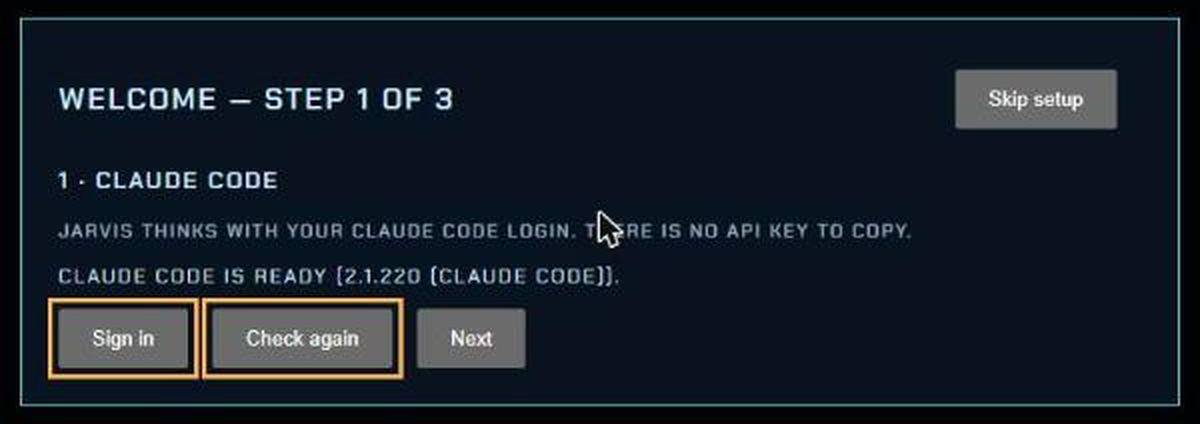
JARVIS welcome window, sign-in step. Screenshot placeholder
The Claude page asking to allow access, with the allow button highlighted.
TODO: Claude sign-in page.
Signed out later, or JARVIS says not logged in? See Troubleshooting.